
Introducing the PowerMic 4!

Nuance PowerMic 4 brings clinician dictation to a new level by making it quick and easy to control the microphone, navigate and select on-screen fields, and insert, review, and edit generated text. With new features such as a larger pointing device, additional buttons, and magnetic mount support, physicians will enhance their productivity with an improved ergonomic control of dictation and speech recognition functions.
With Nuance PowerMic 4, clinicians can rapidly navigate EHR, template,
or report fields and insert text using dictation for new levels of usability
and efficiency.
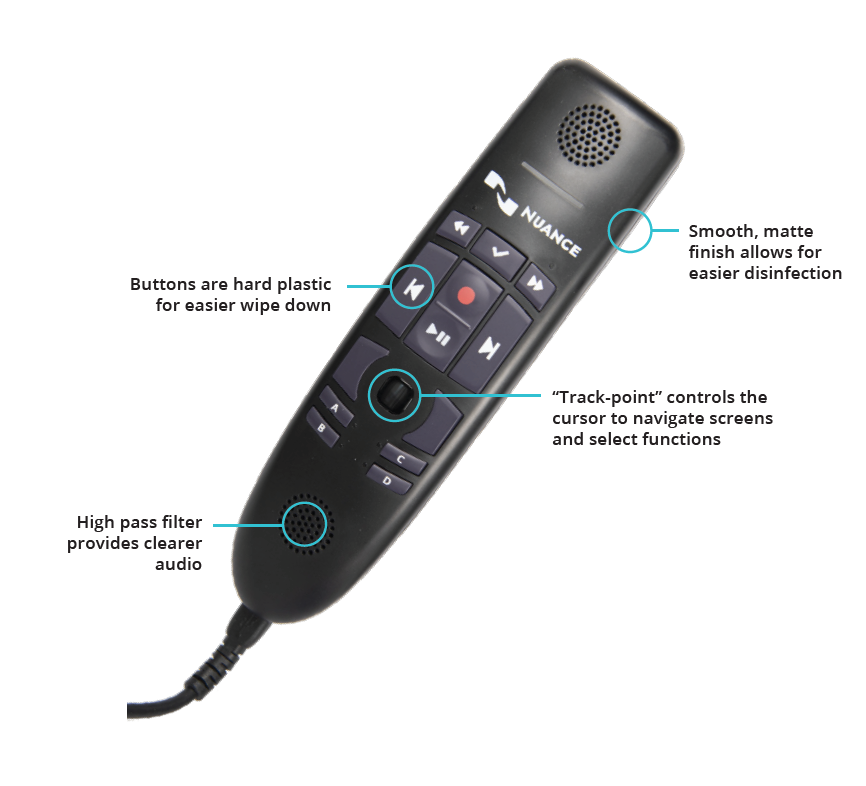
Key Features
- USB plug-and-play installation ensures compatibility with a wide range of computers
- Unidirectional noise-cancellation microphone ensures performance accuracy in even the noisiest environments
- Easy-to-clean antimicrobial surface promotes safety in clinical settings
Compatible with
- Dragon Medical One 2021.4 SR1 (Except Coherence Mode)
- Dragon Professional Anywhere 2021.4 or later
- SpeechKit SDK 2021.4, aka Dragon Medical Embedded (for integrators)
Support coming late 2022 for PowerScribe One & Dragon Pro Individual/Group/Law Enforcement/LegalAvailable Models
- 3-foot USB cable
- 9-foot USB cable
Related Posts
Dragon Medical One License Expired? How to Renew After the Nuance Storefront Shutdown

If you've tried to renew your Dragon Medical One subscription recently and found the Nuance storefront down—or discovered your license ...

Case Study: DAX Copilot – Beacon Health System
A transformative technology adoption
Beacon Health System is a locally owned, not-for-profit health system caring for the communities ...
Case Study: DAX Copilot – University of Michigan Health-West

University of Michigan Health-West (UMHW) tackled the growing crisis of clinician burnout caused by excessive administrative burdens. T...

Dragon Medical One for personal use and private practices
Dragon Medical One dictation software is widely used in large healthcare organizations, but it is also a good fit for smaller, ergonomi...
Nuance Dragon Medical One microphone delay
Due to a Windows security update, a lot of users are experiencing excessive delays after activating their microphone before Nuance Drag...

How to Handle Excessive Clinical Paperwork

Nobody likes paperwork. Sitting down and typing or writing away for hours on end. Paperwork is draining, time-consuming, and sometimes ...

7 Cost-Saving Tips For Your Medical Office
A medical office is a lot like most businesses—Every dollar counts. Any business owner would leap at the chance to cut costs at any giv...

A Guide to Better Physician Work-Life Balance
In his opinion article regarding physician work-life balance published in Frontiers, Dr. Arun Saini writes, “Physician dissatisfaction ...

6 Tips to Help you Handle More Patient Visits
Running a medical office is no easy feat. There’s a lot to manage on a typical day. But when it’s busier than usual, healthcare provide...

How to avoid physician burnout with Dragon software
There’s been a massive problem in the medical industry. And if you’re a medical professional, you’re likely to face that problem someti...
Dragon Medical One troubleshooting – The specified URL cannot be reached
Some Windows security updates and third-party security solutions block access to web addresses required for cloud-based versions of Dra...
Dragon Medical Practice Edition not working with Windows 11
We've received numerous reports from our customers that upgrading to Windows 11 breaks Dragon Medical Practice Edition. Dragon Medical ...